DennTech Trading Bot Full User Manual - Kraken, Binance.US & Gemini
Full manual covering setup, API keys, trading engine logic, risk controls, and all 9 strategies for Kraken, Binance.US, and Gemini.
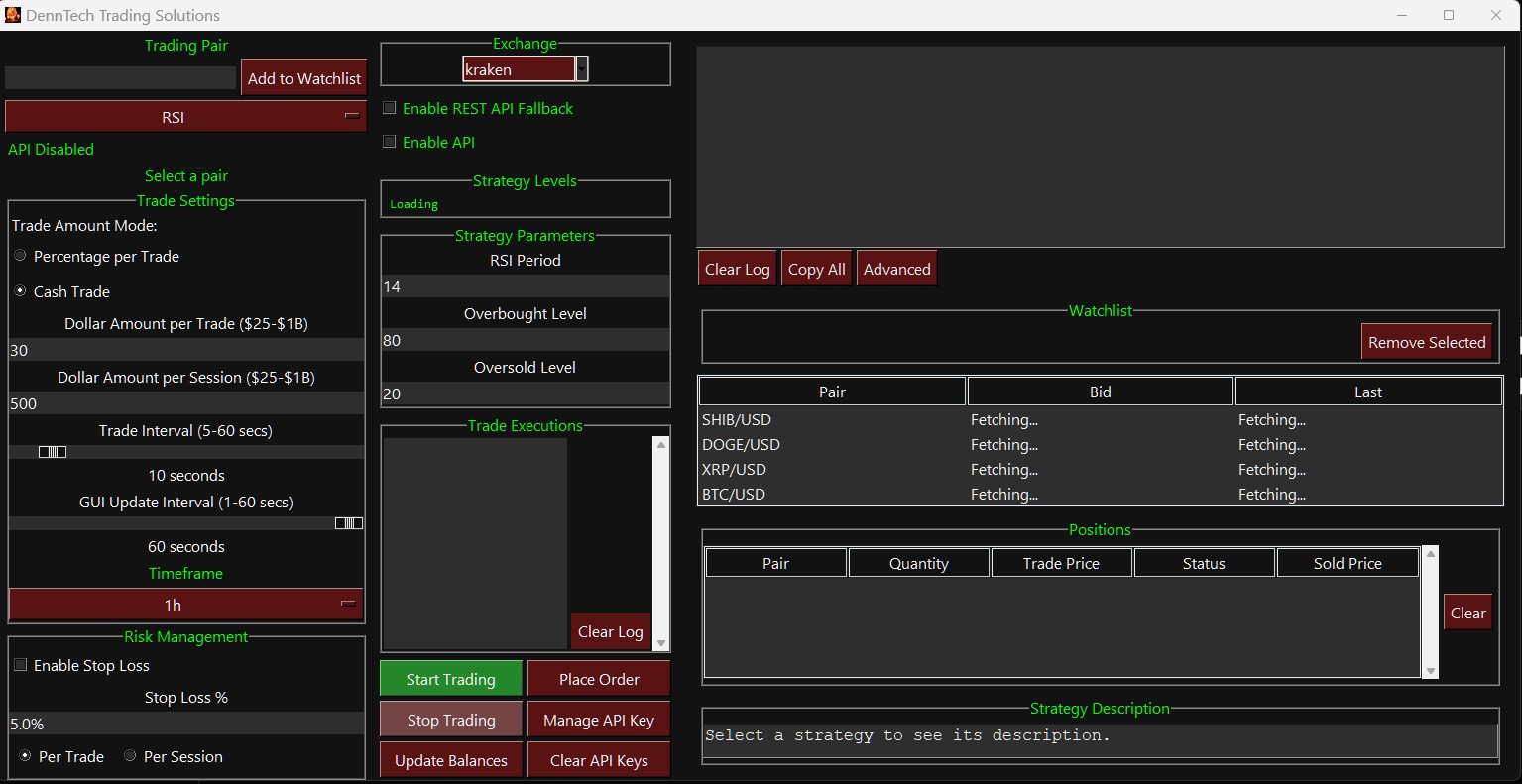
Welcome to the DennTech Trading Solutions full user manual for the standalone crypto trading bot on Kraken, Binance.US, and Gemini. This guide covers dashboard setup, API connection, risk management, trade settings, the 5-buy accumulation engine, and all 9 built-in strategies.Welcome to the DennTech Trading Solutions user manual! This comprehensive guide is designed to help you navigate your bot's features, understand its unique trading engine, and master the built -in strategies. We will break down every aspect of the interface, how the bot calculates and executes trades, and provide real -world examples for each strategy -all without the technical jargon.
Dashboard Overview & Setup
The Left Panel: Setup & Settings
- Trading Pair & Watchlist: Use the search bar to find assets (e.g., BTC/USD). Click "Add to
Watchlist" to save your favorite pairs. Selecting a pair from your watchlist automatically updates the bot's focus and pulls in live pricing.
- Strategy Selector: A dropdown menu where you choose the specific trading logic the bot will
follow (e.g., RSI, MACD, Scalping).
- Live Data Display: Real -time readouts of your available account balance, current asset price,
and specific "Strategy Levels" (which show the exact indicators the bot is watching, like the current moving average or RSI score).
The Right Panel: Live Tracking & API
- Exchange Selection: Choose your connected exchange (Kraken, Binance.US, or Gemini).
- API Management: This is where you connect the bot to your exchange account. It supports
standard keys and provides a "REST API Fallback" toggle, ensuring the bot stays connected even if live data streams temporarily drop.
- Positions Board: A live view of the assets you currently hold, showing the quantity, your average
cost, the status (e.g., "Held", "Sold"), and the target exit price.
- Trade Log: A scrolling historical record of every buy and sell the bot executes, including amounts
and prices.
- Advanced Settings: Allows you to adjust how far back the bot looks into history (Candle Counts)
to calculate its indicators.
Trade Settings & Sizing
Before starting a strategy, you must tell the bot how much money it is allowed to use and how often it should look at the market.
- Trade Amount Mode:
- Cash Trade: You set a strict, fixed dollar amount for every individual buy (e.g., $50 per
trade).
- Percentage per Trade: The bot calculates its buy size based on a percentage of your total
available balance.
- Amount per Session: This is your spending cap. Once the bot has spent this total amount in a
single trading session, it will stop buying to protect your funds.
- Timeframe: Determines the "zoom level" of the chart the bot is reading (from 1 -minute intervals
up to 1 -day intervals). A 1 -minute timeframe means the bot looks for very fast, short -term trends, while a 1 -day timeframe looks for long -term trends.
- Trade Interval: How often (in seconds) the bot analyzes the market to make a decision.
- GUI Update Interval: How often your screen refreshes the live data to save computer processing
power.
Risk Management
Protecting your capital is built into the core of the bot. You can toggle "Enable Stop Loss" and set a specific safety net percentage.
- Per Trade: If a specific purchase drops by your set percentage, the bot sells that specific batch of
assets immediately to prevent further loss.
- Per Session: The bot tracks your overall total losses for the current trading run. If your total losses
hit your set percentage of the "Session Amount", it halts all trading and sells everything to protect your account.
- Trailing Stop Loss: This acts as a moving safety net. As the price goes up, the stop -loss price
moves up with it. If the price peaks and then drops by your set percentage, the bot sells to lock in the profits you gained on the way up.
- Reset Trigger: A unique automation feature. When turned on, if the bot successfully sells all of its
held positions for a specific pair (either by taking profit or hitting a stop loss), it automatically resets the strategy and starts trading fresh without you needing to click "Start" again.
Advanced Settings
The Advanced tab gives you under -the-hood control over how the bot processes historical market data and manages its internal memory.
- Historical Data Counts (Candles): By default, the bot looks back at a specific number of past
candles (time periods) to calculate its technical indicators. Here, you can manually adjust that lookback window (between 100 and 1000 candles) for the SMA, EMA, RSI, and MACD. Increasing the cou nt gives the bot a longer -term mathematical perspective, while decreasing it makes the indicators react faster to recent price action.
- Clear All Data: A hard -reset button for your current trading state. Clicking this immediately wipes
your active positions board, clears your saved watchlist, and flushes the cached trading pairs. Use this if you need to cleanly restart your tracking without altering your API keys or core settings.
- Reset Configuration: This acts as a factory reset. It restores all of your bot's toggles, dropdowns,
and text inputs back to their default, out -of-the-box state and closes the application.
Place Order Window
While the bot is designed for automation, the Place Order button acts as your manual override. It opens a dedicated trading terminal, allowing you to step in and execute trades directly through the connected exchange without relying on a strategy signal.
- Manual Market & Limit Orders: You can select any trading pair from the search bar and instantly
execute a Market buy/sell at the going rate, or place a precise Limit order at a specific price target.
- Built -in Safety Checks: Even when trading manually, the bot protects your account. It
automatically cross -references your manual order against your available exchange balance and your predefined "Session Limit" to ensure you don't accidentally overextend your capital.
- Seamless Integration: Any manual trades executed through this window are instantly routed
through the bot's tracking engine. If you manually buy an asset, it immediately appears on your Positions Board so you can track its profitability alongside your automated trades.
The Unique Trading Engine: How Trades Are Made
The DennTech bot does not just buy once and wait. It uses a unique Accumulation and Unified Execution engine designed to average out your entry prices and secure combined profits.
The Accumulation Cycle (Up to 5 Buys)
When a strategy signals a "Buy", the bot purchases your set Trade Amount. If the market continues to present buying opportunities according to the strategy, the bot will continue to buy, stepping in up to a maximum of 5 times . This allows the bot to build a position safely over time rather than risking everything on a single entry.
The Execution Process
The way the bot exits these trades depends on the type of strategy you are running:
Market Order Strategies (e.g., RSI, MACD, Trend Following, Momentum)
These strategies rely on live market signals to buy and sell instantly at the going market rate.
- The Sell Loop: The bot tracks the indicators continuously. It will accumulate positions up to the
5-buy limit. Once the 5th buy is complete, the bot shifts into a strict "waiting state." It will no longer buy, even if a buy signal flashes. It patiently waits until the s trategy's specific "Sell Signal" becomes active.
- Flattening the Position: When the sell target is achieved, the bot executes a market sell for all
held positions at once. It does not matter if the bot made 1 buy or all 5 buys; the position is completely flattened and cashed out together.
Limit Order Strategies (e.g.,
Scalping
,
Grid Trading
,
Market Making
) These strategies place orders on the exchange's books in advance at specific price targets.
- The Unified Sell Anchor: Instead of tracking 5 separate sell orders for 5 separate buys, the bot
mathematically combines them. Every time a new buy limit order is filled, the bot recalculates your average cost and updates a single, unified limit sell order. This ensures that all accumulated assets are sold together at a profitable target above your average entry price. Here is the comprehensive guide to Denntech bot's trading logic, breaking down exactly how the execution engine works and providing clear, step -by-step examples for every strategy.
The Core Trading Engine: Accumulation & Execution
Your bot uses a sophisticated scaling approach rather than risking your capital all at once. It is built around a maximum 5 -step accumulation cycle and a unified exit strategy.
- Scaling In (Up to 5 Buys): When your chosen strategy flashes a "Buy" signal, the bot purchases
your set trade amount. If the market continues to present buying opportunities according to that strategy's rules, the bot will step in and buy again, up to a maximum of 5 times. This ave rages out your entry cost.
- The Sell Loop (Flattening the Position): The bot is designed to sell all of its position buy orders
when the sell target is achieved. This means the position will be flattened entirely, no matter how many individual buy executions have been made. Once the 5th buy is complete, the bot shifts into a strict waiting state. It will pause further buying until the strategy's specific sell signal becomes active, at which point it executes the market sell and unloads all held positions simultaneously.
- The Unified Sell Anchor (For Limit Strategies): For strategies that place limit orders directly on
the exchange books in advance, the bot recalculates your average cost every time a new buy fills. It then places a single, combined limit sell order for all your accumulated assets at your target profit m argin.
Strategy Examples: Market Order Strategies
These strategies read live market data and execute buys and sells instantly at the current market price when conditions are met.
RSI (Relative Strength Index)
- The Logic: Tracks momentum to identify when an asset is "oversold" (too cheap/panic selling) or
"overbought" (too expensive/euphoria).
- The Example: You set Oversold to 30 and Overbought to 70.
- Bitcoin drops sharply, pushing the RSI down to 28. The bot executes Buy #1 .
- The price continues to bleed, keeping the RSI at 25. The bot executes Buy #2 and Buy #3
over the next few intervals.
- The market reverses and surges. The RSI hits 72. The sell signal triggers, and the bot
executes a market sell, instantly flattening all 3 buys into a single profitable exit.
MACD (Moving Average Convergence Divergence)
- The Logic: Looks for shifts in trend direction by watching a fast -moving price average cross over or
under a slower -moving price average.
- The Example: 1. The fast MACD line crosses above the slow signal line, indicating upward
momentum is starting. The bot executes Buy #1 .
The momentum stays strong for a while, but eventually, the rally runs out of steam. The fast MACD line crosses below the slow signal line. The sell signal triggers, and the bot sells the position to lock in the gains before the trend reverses further.
Trend Following
- The Logic: A highly conservative strategy that demands multiple confirmations. It requires a
short -term price average to cross above a long -term average, and checks that the RSI isn't already overheated.
- The Example:
- The 10 -period average price crosses above the 50 -period average price. The bot checks the
RSI, sees it is sitting at a healthy 50 (below the 70 cutoff), and executes Buy #1 .
- The trend continues upward smoothly.
- Days later, the momentum shifts. The 10 -period average dips back below the 50 -period
average. The bot executes a market sell, flattening the position.
Mean Reversion
- The Logic: Operates on the rubber -band theory: extreme price spikes or crashes are temporary,
and the price will eventually snap back to its historical average.
- The Example:
- The historical average price of an asset is $100. You set a deviation boundary of $5.
- A sudden market panic drops the price to $93 (below the $95 lower boundary). The bot
executes Buy #1 .
- The panic subsides, and the price snaps back, eventually overshooting the average to hit
$106 (above the upper boundary). The bot executes the market sell.
Momentum Trading
- The Logic: Chases explosive price action, jumping onto assets that are currently experiencing
massive, rapid volume and price spikes.
- The Example: You set a 3% trigger over a 10 -period lookback.
- A sudden news event causes a coin to spike 4% in just a few minutes. The bot detects this
momentum and executes Buy #1 to ride the wave.
- The coin climbs another 2%, but then buying pressure dies down and the momentum
drops back below your safety threshold.
- The bot executes a market sell to secure the profits before the spike retraces.
Strategy Examples: Limit Order Strategies
These strategies are proactive. They place exact price targets on the exchange's order books and wait for the market to come to them. 6.
Scalping
- The Logic: A high -frequency strategy aiming to capture tiny price movements repeatedly by
placing buy and sell targets very close to the current price.
- The Example: You set a target profit of 0.5%.
- The asset is at $100. The bot places a limit buy at $99.50.
- The market dips slightly, filling the buy. The bot instantly places a Unified Sell Anchor at
$100.00.
- The market wiggles back up, filling the sell. The bot instantly prepares for the next cycle.
7.
Grid Trading
- The Logic: Casts a "net" of buy and sell orders across a defined price range, profiting heavily when
the market bounces sideways.
- The Example: You set a grid with steps every 1%.
- The current price is $100. The bot sets a buy level at $99 and a sell level at $101.
- The price drops to $99, filling Buy #1 . The bot now sets the next buy level at $98 and lowers
the Unified Sell Anchor to $100.
- The price drops to $98, filling Buy #2 . The bot lowers the Unified Sell Anchor to $99 to
ensure both buys clear at a net profit.
- The price bounces to $99, triggering the Unified Sell Anchor and flattening the position.
8.
Market Making
- The Logic: Attempts to profit from the "spread" -the tiny gap between what buyers are willing to
pay (the bid) and sellers are willing to accept (the ask).
- The Example: You set a spread target of 0.2%.
- The true midpoint of an asset is $10.00. The bot offers a limit buy at $9.99 and a limit sell at
$10.01.
- A random market participant sells into your $9.99 buy order.
- Shortly after, another participant buys into your $10.01 sell order. You capture the $0.02
spread without caring which direction the broader market is heading.
Arbitrage
- The Logic: Looks for price discrepancies between two different exchanges for the exact same
asset.
- The Example: You set a minimum profit trigger of 0.5%.
- Bitcoin suddenly drops on Kraken to $60,000, but is still trading at $60,500 on Binance.US.
- The bot spots this 0.8% discrepancy. Because it is higher than your 0.5% threshold, the bot
signals a buy on Kraken and a simultaneous sell on Binance.US, capturing the difference. Note: this strategy requires active balances on both connected exchanges.
This level of detail shows how the bot handles execution under different market conditions across Kraken, Binance.US, and Gemini.
Detailed Strategy Guide & Examples
Here is how each specific strategy thinks, acts, and executes trades.
RSI (Relative Strength Index)
Measures the speed and change of price movements to see if an asset is overbought (too expensive) or oversold (too cheap).
- Logic: Buys when the RSI drops below your "Oversold" setting. Sells when it rises above your
"Overbought" setting.
- Example: You set Oversold to 30 and Overbought to 70. The price of an asset drops sharply,
pushing the RSI to 25. The bot executes a market buy. If the price stays low and RSI stays under 30, it may buy up to 4 more times. It then waits. Once the price rebounds an d pushes the RSI above 70, the bot sells the entire accumulated position.
MACD (Moving Average Convergence Divergence)
Tracks the relationship between two moving averages of an asset's price to spot shifts in momentum.
- Logic: Buys when the "Fast" MACD line crosses upward over the "Slow" Signal line (bullish
momentum). Sells when the Fast line crosses downward below the Signal line (bearish momentum).
- Example: A coin has been trending down, but buyers step in. The MACD line crosses above the
Signal line. The bot executes a buy. It rides the upward wave until the momentum cools off and the lines cross back downward, at which point it sells the entire position.
Trend Following
Combines multiple indicators (Short Moving Average, Long Moving Average, and RSI) to ensure it only buys into confirmed, healthy uptrends.
- Logic: Buys when the Short -term average price crosses above the Long -term average price, and
the RSI indicates the asset isn't already overbought. Sells when the Short average falls back below the Long average.
- Example: The 10 -period average crosses above the 50 -period average. The bot checks the RSI-it's at a healthy 50. The bot buys into the trend. Days later, the trend exhausts, the 10 -period
average dips below the 50 -period, and the bot sells.
Mean Reversion
Operates on the belief that extreme price spikes or crashes are temporary, and the price will eventually snap back to its historical average.
- Logic: Calculates a moving average and a "deviation" boundary around it. Buys when the price
crashes below the bottom boundary. Sells when the price recovers above the top boundary.
- Example: The average price is $100. The bot sets a boundary at $95. Sudden panic drops the price
to $92. The bot buys, anticipating a snap -back. When the price recovers and surges to $105 (above the upper boundary), the bot sells.
Scalping
A high -frequency limit strategy aiming to capture tiny price movements over and over again.
- Logic: Places a limit buy slightly below the current price. The moment it fills, it immediately
places a "Unified Sell Anchor" at a strict, tiny percentage above the buy price (e.g., 0.5%).
- Example: Asset is at $100. Bot places a buy at $99.50. It fills. The bot instantly places a sell limit
at $100.00. The price wiggles up, fills the sell, and the bot repeats the process, capturing small, consistent profits.
Grid Trading
Casts a "net" of buy and sell orders across a specific price range to profit from a market that is bouncing up and down sideways.
- Logic: You define a price range and how many "levels" (rungs on a ladder) to create. It places buys
below the current price and sells above it.
- Example: You set 10 levels within a 5% range. If the price drops to level 1, it buys. If it drops to
level 2, it buys more (up to 5). As the price bounces back up, it unloads those buys at the higher grid levels.
Market Making
Acts like a currency exchange booth, attempting to profit from the "spread" (the difference between what buyers are willing to pay and sellers are willing to accept).
- Logic: Places buy orders slightly below the market midpoint and sell orders slightly above it.
- Example: The true midpoint of an asset is $10.00. The bot offers to buy at $9.98 and offers to sell
at $10.02. It captures that 4 -cent spread as the market naturally fluctuates.
Momentum Trading
Chases explosive price action, jumping onto rockets that are already taking off.
- Logic: Looks back over a set number of periods. If the price has surged by a certain percentage
(your "Trigger"), it buys instantly. Sells when that momentum reverses.
- Example: You set a 3% trigger over 10 periods. A news event causes a coin to instantly spike 4%.
The bot detects the momentum, buys in, and rides the surge until the buying pressure dies down and reverses, prompting a sell.
Arbitrage
Looks for price discrepancies between two different exchanges for the exact same asset.
- Logic: Compares the price on your primary exchange against a secondary exchange. If the price
difference is greater than your "Min Profit" percentage, it executes a trade.
- Example: Bitcoin drops sharply on Kraken to $50,000 but is still trading at $50,500 on
Binance.US. The bot spots the 1% difference, validates it against your minimum profit requirement, and executes the trade. (Note: To fully utilize this, funds must be managed across both exchanges).This user manual applies to DennTech desktop crypto trading bot deployments across Kraken, Binance.US, and Gemini, and is intended to help traders configure strategies, understand the execution engine, and operate the software safely.
Manual extracted from the official DennTech Trading Bot PDF and formatted for web reading.